In the beginning I had difficulties to remember where to find sorting options for the chart axis labels. Clicking around chart area and checking properties got to my nerves but then I decided to write it down for the future and then I begin to remember. I thought this would be useful post to some others too. In this example I add sorting to x-axis "finished_month".
[ 1 ] Click over x-axis labels so that x-axis category field is seen
[ 2 ] Right-mouse click open
Category Group Properties and add sorting.
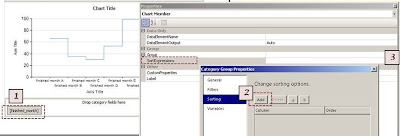 |
| x-axis labels - sorting |
Notice...
[ 3 ] It doesn't show anything at Chart Member
Properties: SortExpression box. You have to click it open to see the sorting options for that Chart Member.

